Error Joining Linux to AD
My lab has been running AD since 2002. So I started with Windows Server 2000 and I have upgraded to every version since. When in 2025 when I tried to join a Linux (Fedora 43 KDE) laptop to my AD I ran into an issue. I followed the recommneded steps:
-
Make sure the domain is DNS resolvable:
brian@fedora:~$ nslookup test.local Server: 127.0.0.53 Address: 127.0.0.53#53 Non-authoritative answer: Name: test.local Address: 192.168.122.13 -
Set the hostname to the FQDN:
sudo hostnamectl set-hostname fedora.test.local -
Finally the problem command:
 brian@fedora:~$ sudo realm join test.local -v
 * Resolving: _ldap._tcp.test.local
 * Performing LDAP DSE lookup on: 192.168.122.13
 * Successfully discovered: Test.local
 realm: Couldn't authenticate as Administrator@TEST.LOCAL: KDC has no support for encryption type
I went down the rabbit hole of all the things that could cause the issue, from not having the LDAPS cert trusted, editing the krb5.conf to GPO to set the Kerberos encryption types. The actuall solution was easier than all of that. In AD I had to go to the user I was using to join the domain and check both:
“This account supports Kerberos AES 128 bit encryption.”
“This account supports Kerberos AES 256 bit encryption.”
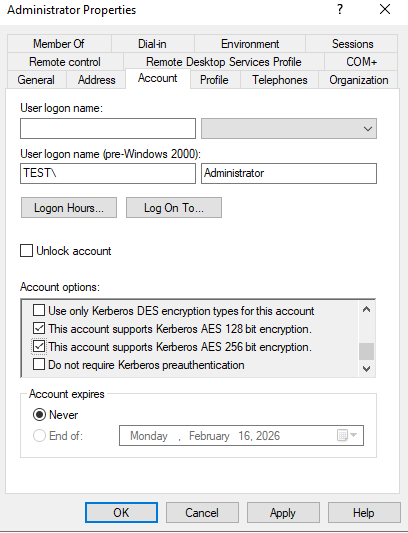
The next important step after that is to change the password. The password can bet set to the same or different but it must be reset.
Try to run the join command again and:
brian@fedora:~$ sudo realm join test.local -v
* Resolving: _ldap._tcp.test.local
* Performing LDAP DSE lookup on: 192.168.122.13
* Successfully discovered: Test.local
Password for Administrator@TEST.LOCAL:
* Couldn't find file: /usr/sbin/oddjobd
* Required files: /usr/sbin/sssd, /usr/sbin/oddjobd, /usr/libexec/oddjob/mkhomedir, /usr/libexec/sssd/gpo_child, /usr/sbin/adcli
* Resolving required packages
* Installing necessary packages: oddjob oddjob-mkhomedir adcli sssd-ad
* LANG=C /usr/sbin/adcli join --verbose --domain Test.local --domain-realm TEST.LOCAL --domain-controller 192.168.122.13 --login-type user --login-ccache=/
var/cache/realmd/realm-ad-kerberos-FE07I3
* Using domain name: Test.local
* Calculated computer account name from fqdn: FEDORA
* Using domain realm: Test.local
* Sending NetLogon ping to domain controller: 192.168.122.13
* Received NetLogon info from: AD03.Test.local
* Wrote out krb5.conf snippet to /var/cache/realmd/adcli-krb5-hZZg26/krb5.d/adcli-krb5-conf-w8sK5K
* Using GSS-SPNEGO for SASL bind
* Looked up short domain name: TEST
* Looked up domain SID: S-1-5-21-2613415956-2557402697-1370877112
* Received NetLogon info from: AD03.Test.local
* Using fully qualified name: fedora.test.local
* Using domain name: Test.local
* Using computer account name: FEDORA
* Using domain realm: Test.local
* Calculated computer account name from fqdn: FEDORA
* Generated 120 character computer password
* Using keytab: FILE:/etc/krb5.keytab
* A computer account for FEDORA$ does not exist
* Found well known computer container at: CN=Computers,DC=Test,DC=local
* Calculated computer account: CN=FEDORA,CN=Computers,DC=Test,DC=local
* Encryption type [16] not permitted.
* Encryption type [23] not permitted.
* Encryption type [3] not permitted.
* Encryption type [1] not permitted.
* Created computer account: CN=FEDORA,CN=Computers,DC=Test,DC=local
* Trying to set computer password with Kerberos
* Set computer password
* Retrieved kvno '2' for computer account in directory: CN=FEDORA,CN=Computers,DC=Test,DC=local
* Checking RestrictedKrbHost/fedora.test.local
*    Added RestrictedKrbHost/fedora.test.local
* Checking RestrictedKrbHost/FEDORA
*    Added RestrictedKrbHost/FEDORA
* Checking host/fedora.test.local
*    Added host/fedora.test.local
* Checking host/FEDORA
*    Added host/FEDORA
* Discovered which keytab salt to use
* Added the entries to the keytab: FEDORA$@TEST.LOCAL: FILE:/etc/krb5.keytab
* Added the entries to the keytab: host/FEDORA@TEST.LOCAL: FILE:/etc/krb5.keytab
* Added the entries to the keytab: host/fedora.test.local@TEST.LOCAL: FILE:/etc/krb5.keytab
* Added the entries to the keytab: RestrictedKrbHost/FEDORA@TEST.LOCAL: FILE:/etc/krb5.keytab
* Added the entries to the keytab: RestrictedKrbHost/fedora.test.local@TEST.LOCAL: FILE:/etc/krb5.keytab
* /usr/bin/systemctl enable sssd.service
* /usr/bin/systemctl restart sssd.service
* /usr/bin/sh -c /usr/bin/authselect select sssd with-mkhomedir --force && /usr/bin/systemctl enable oddjobd.service && /usr/bin/systemctl start oddjobd.se
rvice
Backup stored at /var/lib/authselect/backups/2026-01-17-13-54-04.liSrxD
Profile "sssd" was selected.

Make sure that SSSD service is configured and enabled. See SSSD documentation for more information.

- with-mkhomedir is selected, make sure pam_oddjob_mkhomedir module
 is present and oddjobd service is enabled and active
 - systemctl enable --now oddjobd.service

Created symlink '/etc/systemd/system/multi-user.target.wants/oddjobd.service' → '/usr/lib/systemd/system/oddjobd.service'.
* Successfully enrolled machine in realm
The laptop is now joined to the AD domain.
Just some tips:
- Enable oodjob service
systemctl enable --now oddjobd.service - The user name will be in the format user@Domain.local. In my example it would be administrator@Test.local. As always Linux is case sensitive.
- Add the user to sudoers
sudo usermod -aG wheel username